I did a presentation at work that tried to give a general introduction to cybersecurity taking in phishing and ethical hacking. I’ve re-jigged the slides a bit and uploaded them here on the off chance that somebody finds them useful for some reason.
Blog

Backblaze belatedly inform customers of Facebook tracking breach
I’ve just received the following email from Backblaze informing me, almost two months after they discovered it, that they’d accidentally been sending some customer file metadata to Facebook. As it happens, I was already aware of this incident from coverage on Hacker News amongst other places. Also, I don’t upload any confidential data to my Backblaze account without encrypting it (and its filename) locally first. On this occasion, the breach was relatively minor but it’s always a good idea to have this kind of defense in depth strategy when using cloud services.
We are writing to inform you of a recent event that may have involved your account. On March 8, 2021, a new Backblaze marketing campaign was incorrectly configured to potentially trigger an advertising pixel on a signed-in page “b2_browse_files2.htm.” The issue was discovered on March 21, 2021 and promptly fixed the same day.

You are receiving this correspondence because, based on our investigation, we believe that you may have accessed that page during this time frame. If you accessed that page and you took the additional steps of browsing your files AND clicking on a file to preview file information, certain metadata consisting of the file name, file size, and upload timestamp may have been shared with Facebook. No customer files, nor the content of any customer files, were shared. Facebook is obligated to only process information based on our instructions and we have instructed them to not further process this data and to delete it. We therefore have no reason to believe this event had any impact on your account, but we nevertheless wanted to provide you with this update and apologize for this mistake.

If you would like more information, please see the following link:  Privacy Update: Third-party Tracking (backblaze.com).

If you have any questions, please contact Backblaze Customer Support at [email protected].

The Backblaze Team

From Hacker News Submission to Site Compromise In One Simple Form
I was browsing around Hacker News earlier today when I came across an strange site that had made it all the way to the front page despite consisting of a single page with the three letters ‘WTF’ on it. Naturally my reaction was “WTF?”
(I’m not linking to the site in question as it’s still vulnerable at the time of writing)
It was pretty obvious that whatever was supposed to have been there had been compromised and the homepage replaced with the aforementioned TLA. I was curious to know how it happened so I started with the archive.org cache of the site. From there it was just a case of viewing source and finding the link to the Javascript file.
And there in the Javascript was the obvious culprit:
 document.form_body.sorce.value = document.documentElement.outerHTML;
 document.form_body.action = './php/file_put_contents_index.php';
 document.form_body.submit();
What this is doing is taking part of the HTML document and submitting it to a form which, from the filename, we can assume writes it to the filesystem. If you’re going to do this (and you almost certainly shouldn’t) your server side script absolutely must sanitise the input. This particular site didn’t. This is a bad thing TM. It’s never safe to assume that anything POSTed to your backend is actually what you expect it to be. In this case, the site was a social bookmarking tool and the script seems to have been intended to download a preview of the bookmarked site in an iframe and then send the HTML to the backend to be incorporated into the main page HTML. (I have no idea why you would do it like this).
By constructing our own POST (using a technical, high tech hacker tool known as Firefox) we can send arbitrary data and have it overwrite the the index.html
But, wait! There’s more.
It gets worse. The form appears in the HTML like so:
<form name="form_body" method="post">
<input type="hidden" name="filename" value="../index.html">
Yep, we get to choose which file to write to as well. Back in our high tech hacking tool we can change that filename value to, say:
<input type="hidden" name="filename" value="../leethack.php">and send a payload of:
sorce=%3C%3Fphp%20phpinfo%28%29%3B%20%3F%3Eand, hey presto, a new file gets written in the root directory of the site and it is executable PHP.
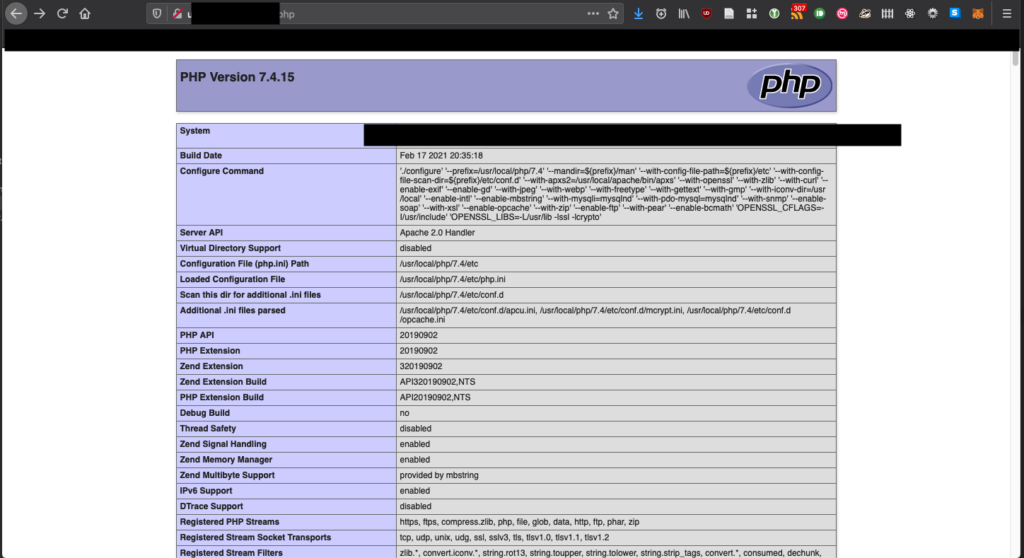

If I was a maliciously-minded individual, I could now upload a PHP web shell and execute arbitrary commands with the privileges of the account that’s running the PHP daemon. In the interests of not getting arrested and charged under Section 3 of the Computer Misuse Act, I didn’t dig any further.
The lessons we learn from this:
- Sanitise your inputs! Do not ever trust anything submitted from the client
- Don’t write arbitrary data to disk. Caveat: there’s a few cases where this has to be done but you absolutely must know what you’re doing.
- Posting sites to tech forums like Hacker News pretty much guarantees that somebody is going to try peaking under the hood to see how it works. If you’ve not stuck to basic security principles it won’t take long for someone to find a hole.
Quick Start: React When You Already Know Javascript
There’s a multitude of resources online that’ll teach you to build websites with React starting from first principles. But if you want to pick up React when you already know Javascript you might find yourself wading through a lot of basics before you get to what you want to learn.
This article (and the others that follow) are basically brain dumps of things I wish I’d known before starting on my first React/Typescript project. This first one is a very high level overview of some key concepts.
Prerequisites
So what should you already know? I reckon these are probably the minimum prerequisites:
- Javascript
- HTML5
- Setting up your dev environment and installing NPM packages
- Ideally, some experience using a typed language such as C, C# or Java
I’m going to cover React in conjunction with Typescript. You don’t have to use them together but personally I think it makes for more robust code thanks to its compile time type checking. I’m not intending to regurgitate stuff you can find elsewhere so I’ll link out to documentation sources which you might want to consult.
Getting Started
The first thing you want to do is set up a basic project structure. To do this we use a package called, sensibly enough, Create React App. As per the Quickstart, run the following at your command line :
npx create-react-app my-app --template typescript
cd my-app
npm start
Two things just happened. One, we created a new React project and, two, we started a development server to run the project. That development server will keep monitoring the project directory and rebuild it any time one of your source files change.
Wait! Building?
Yep. Unlike some other Javascript frameworks you might have used previously, React projects need to be built before they can be run. Part of this involves transpiling Typescript into Javascript that the browser can run and part of it is down to Webpack which does things like minifying the output files and copying images and styles into the right directory.
When running the development server, some extra Javascript is inserted into the page which causes the browser to check back every ten seconds and hot reload the page if any of the code has changed. This is quite cool and makes for quicker iterations of coding. It also has the unfortunate side effect of creating an extra thing that can go wrong. If you’re editing your code and not seeing the changes you expect in the browser, check in on your development server process. It’s probably decided to just stop running and you’ll need to restart it. I wasted quite a lot of time thinking I was doing something wrong before I figured that one out.
Components
React works with a concept of components. Components are self-contained bits of functionality that combine presentation and function. You as developer decide how big a chunk of functionality each component represents but, in general, if you find you’re losing track of what a component is for or you’re repeating yourself, you probably need to break things down into smaller components.
A key principle of React is that we favour composition over inheritance. If you have several components that share some common functionality, you might be tempted to have them inherit from a common base. Instead, create a component that handles the common stuff and takes a more specialised component as a child.
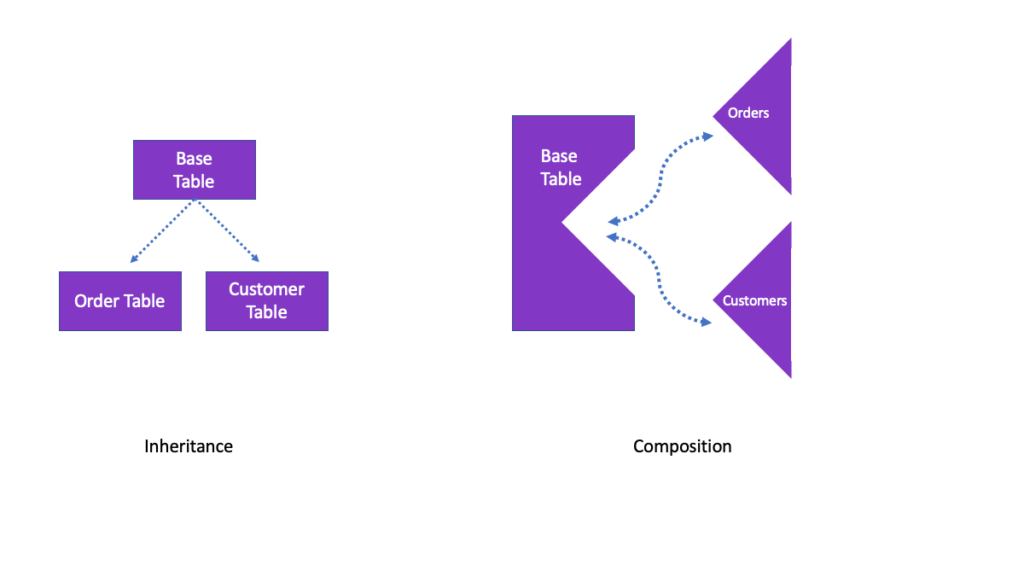

With inheritance we specialise through derived classes. With composition, we specialise by slotting the specialised component in as a child of the more general one. You usually pass data into components as props (there are other ways which we will discuss later). Props are just parameters but it is important to understand that they only go one way. You pass props into components. Components don’t change the props. This is not Angular JS with its two-way data binding.
So how do we get data out of the component again? We can use the usual Javascript method of calling event handlers. You can pass function references into components as props. For example, a button component can have an onClick prop which is a function that is called when the button is clicked.
JSX
You can’t do much with React without encountering JSX. It’s a way of expressing the browser DOM in Javascript via an XML-like format. Basically, it looks a lot like HTML and for most purposes you can probably treat it as HTML. One difference is that the nodes can be either HTML entities or they can be React components. And when they’re React components the attribute values are those props we talked about above.
When using HTML entities in JSX there are a couple of differences you should be aware of:
- The HTML
classattribute is renamed asclassName - Inline styles are expressed as Javascript objects rather than as a string
Functions, classes and functional components
A React component can be created in one of three ways : as a function, as a class or as a functional component. Pretend you haven’t heard about functions and classes. The modern way of using React is to use functional components and something called Hooks.
A functional component is just a Javascript function that, when called, outputs some JSX. When the React framework calls your function that’s known as a render. A component renders whenever its props change or when its parent component re-renders. Initially these renders take place in a Virtual DOM which is an in-memory representation of the browser DOM. Once React has finished rendering all the components, the actual browser DOM is synchronised with the virtual DOM. This makes the rendering process much faster and more efficient.
Calling a function to spit out some JSX is great but what happens when we want our component to do something more involved, like maintaining its own state? That’s where hooks come in. According to the official tutorial :
Hooks are functions that let you “hook into” React state and lifecycle features from function components
https://reactjs.org/docs/hooks-overview.html#but-what-is-a-hookPersonally, I don’t think “hooks” is a great name but it’s what we’re stuck with so let’s just run with it. Hooks are just functions that you can import into your components. By convention their names all start with the word use but apart from that there isn’t really anything special about them.
What you do need to be aware of though are the so-called “rules of hooks“. Namely:
- Only Call Hooks at the Top Level
- Only Call Hooks from React Functions
Now’s probably a good time to skim read the official overview of hooks if you haven’t already.
Things to drop-in to your project
React has a massive ecosystem of open source components, frameworks and libraries. You can quickly end up facing the paradox of choice. These are the libraries I wish I’d known about at the beginning of my React journey:
- React Router – handles single page app navigation
- React Hook Form – easy and powerful form validation
- React Query – easily fetch data from your backend servers. Transparently handles caching, refetching, long polling etc
- React Table – hooks for handling HTML tables. Bring your own UI and use the hooks to give you things like sortable, editable, filterable columns
Redux
One thing you might encounter quite a lot if you read other articles about React is Redux. For some people, React and Redux are one and the same. This is not the case. Redux is a state management library which can be really useful in large projects but for beginning React users it just adds complexity. Don’t feel pressured into using it. Even the creator of Redux says
don’t use Redux until you have problems with vanilla React.
https://redux.js.org/faq/general#when-should-i-use-reduxNext time
Coming up in subsequent posts : a quick overview of Typescript and starting to build a site with those drop-ins I mentioned above.

The Rust Programming Language downloadable PDF
Everyone seems to be talking about Rust at the moment. It’s a new programming language which is “empowering everyone to build reliable and efficient software”.
There’s a great book you can read for free online but there didn’t seem to be a downloadable version for reading offline so I created a PDF using trpl-ebook, Calibre and the source repository.
Since it might be useful to someone else I’ve uploaded it below. This version was created from the repo on 9 February 2021. If I get round to it, I’ll write a script to keep it autoupdated in future.
Download the Rust manual in PDF here
Header image credit : Jerry Charlton
Cheapest Amazon EC2 Spot Price Finder
Amazon EC2 provides a great way to rent processing power in the cloud and Spot Pricing gets you great pricing by bidding on spare capacity in the cloud. Quite often I find myself wanting to run some processing load but find it hard to immediately see which region is cheapest at that given time. So I knocked up a quick script to give me the info in a handy table.
You can see the current cheapest Amazon EC2 spot prices here